
How to Choose Quran School Management Software in Nigeria
A practical guide for Nigerian Quran schools comparing scheduling, lesson records, parent access, fees, privacy, migration and support before choosing management software.
An evidence-led comparison of Islamic school management software for Quran academies, madrasahs and hybrid schools, with practical checks for teaching, operations, fees and privacy.
Updated

Islamic school management software connects the records and decisions around enrolment, teachers, classes, attendance, Quran or Islamic Studies progress, parent communication and fees. The right choice depends on the school model: a full-time school, weekend maktab, Tahfiz programme, online Quran academy and masjid community programme do not necessarily need the same system.
This guide was prepared by Al-Ibiewi LMS, which is included in the comparison. Competitor descriptions come from each vendor's own public materials reviewed on 16 October 2026; they are attributed claims, not independent test results. Products, prices and availability can change, so verify every shortlisted workflow in a current demonstration and written quotation.
The products below represent different operating models and regions. They are not ranked. 'Useful shortlist when' means the vendor's public positioning appears relevant to that need; it does not mean Al-Ibiewi has independently verified the complete product.
| Platform | Publicly described focus | Useful shortlist when | Verify in the demonstration |
| Al-Ibiewi LMS | Live online, physical and hybrid Islamic education; one-to-one and Halaqah scheduling; Quran, Arabic and Islamic Studies records; parent reporting and Nigerian fee workflows | A Quran academy needs teaching operations, session evidence and family reporting connected in one role-scoped system | Installable web-app fit, external meeting services, migration/export scope and the current Paystack fee flow |
| Alif Cloud | Full-time and weekend Islamic schools; registration, student records, Quran and Arabic progress, gradebook, Stripe billing, communication and native mobile apps | A North American school wants a broad SIS/LMS and family communication stack | Country availability, migration, plan limits, payment setup and the exact Quran workflow your teachers use |
| MarkTrack | Islamic schools, maktabs and Hifz programmes; daily Sabaq, Sabqi and Manzil records, gradebook, enrolment, Stripe/ACH billing and native apps | A US-based school wants Hifz, academics and tuition in the same product | Current pricing, local payment support, export terms and how predicted Hifz completion is calculated |
| Ummah | Masjid and community programmes; term registration, rosters, attendance, instalments, sibling discounts, events and community communication | A masjid or community organisation primarily needs programmes, payments, events and member engagement | Whether academic grading, detailed Quran progress and the required school records need a separate SIS |
| IBEAMS | Maktabs, madrasahs and Islamic private schools; attendance, fees, parent access, homework, reports and communication | A UK maktab wants an established administration and parent-portal workflow | Which progress tools and support channels are add-ons, mobile-app scope, data export and setup assistance |
| Edsynk | Nigerian Islamiyyah, Tahfiz and hybrid schools; configurable levels, Arabic report cards, results, attendance and a school-wide Hifz position register | A Nigerian physical or hybrid school prioritises results, report cards and local academic structures | Daily Sabaq/Sabqi/Manzil depth, live-class operations, the required plan and internet/offline boundaries |
A small programme can run well with simple tools when one person knows every learner and only a few classes happen each week. The need for a shared system appears when coordination becomes harder than teaching.
Software will not fix an undefined policy. Before comparing products, decide what counts as attended, late, cancelled, teacher-missed and completed; who may change those records; what a teacher must log after class; and what parents should see.
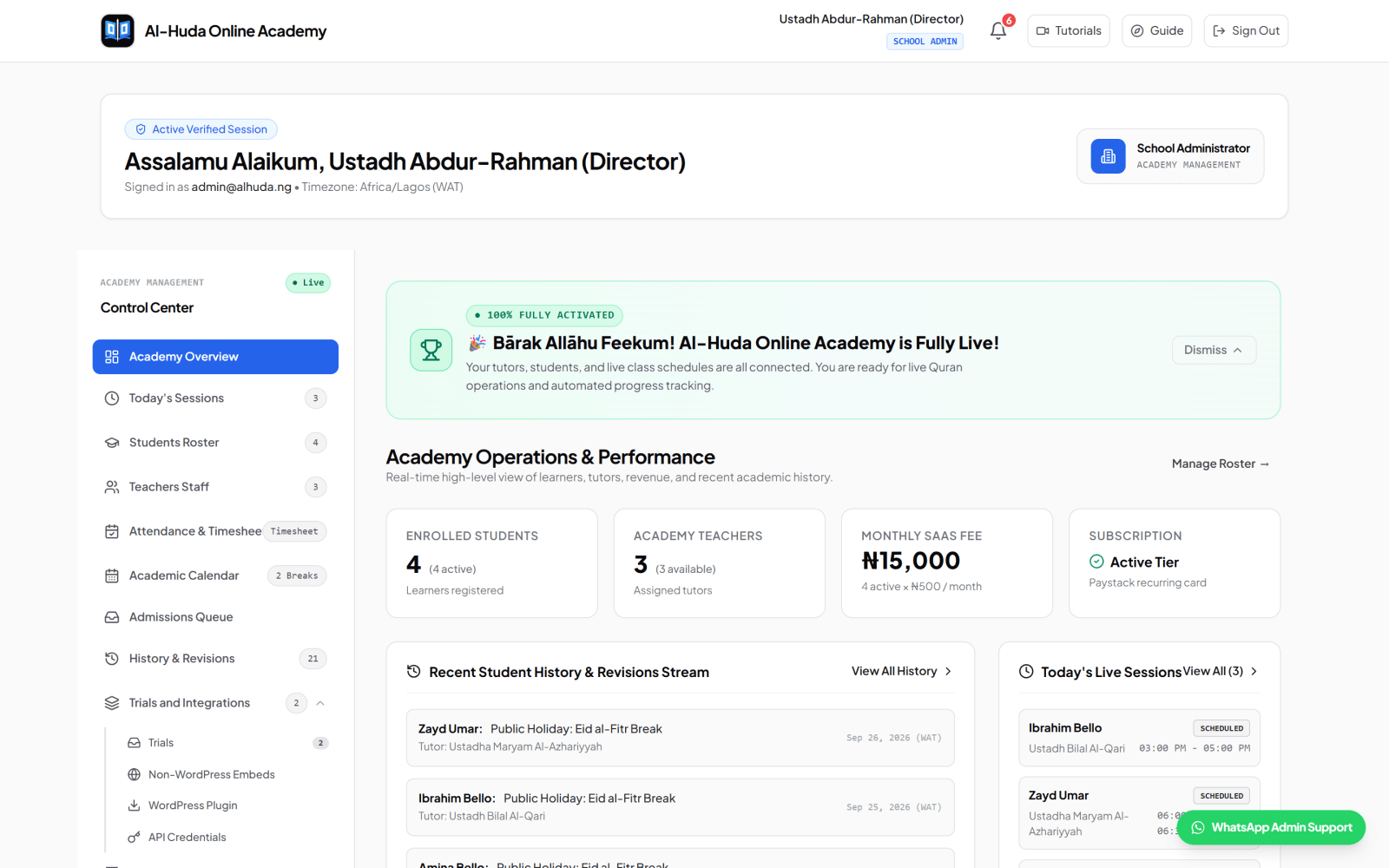
A useful demonstration should follow one fictional learner from first enquiry to the school's monthly review. For a fuller operating model, use the online Quran academy management workflow.
Ask every shortlisted vendor to perform this sequence. If several steps require manual exports, private staff messages or duplicate records, include that work in the comparison.
The student profile should connect the learner to the correct school, family or adult account, assigned teacher, programme, status, schedule and learning history. Test a minor learner, an adult learner and two siblings using one parent account. Those cases reveal whether relationships and permissions were designed carefully.
A director should see who teaches each learner and whether a teacher has room for another assignment. A teacher should see only the learners and sessions assigned to that role. Ask how reassignments and group membership affect historical lesson records, future schedules and family visibility.
Online schools may coordinate a learner, teacher and administrator in different countries. The intended day, time and timezone must be unambiguous. Test daylight-saving changes, one-off rescheduling, holidays, pauses, make-up lessons and teacher substitutions. Confirm whether video is hosted inside the platform or opened through Google Meet, Microsoft Teams, Zoom or another service.
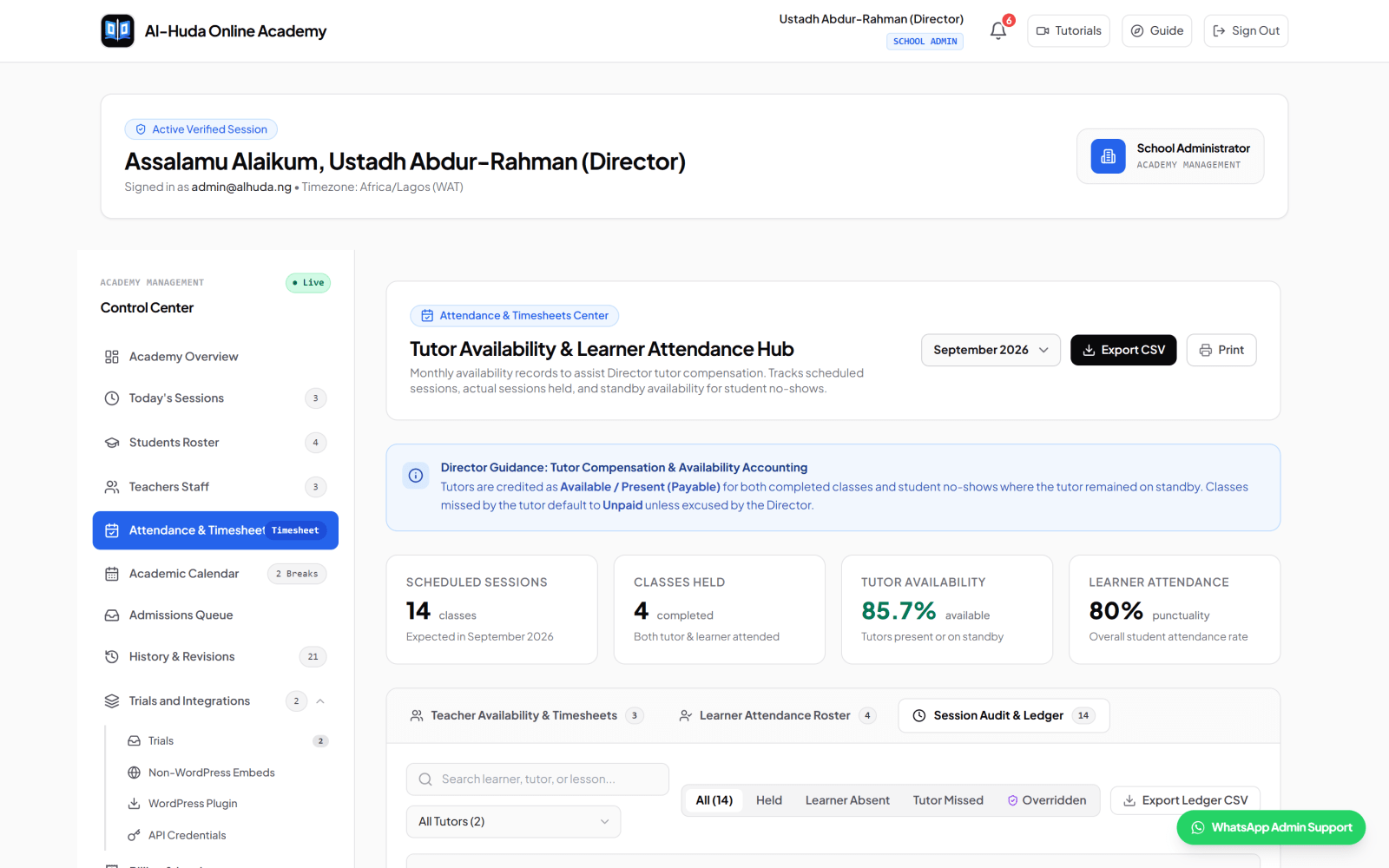
A single present-or-absent checkbox is rarely enough. Useful records distinguish whether the learner attended, whether the teacher was present, whether the class was held, and why a scheduled session did not proceed. Ask who can correct a record, whether a reason is required, and whether the original decision remains traceable.
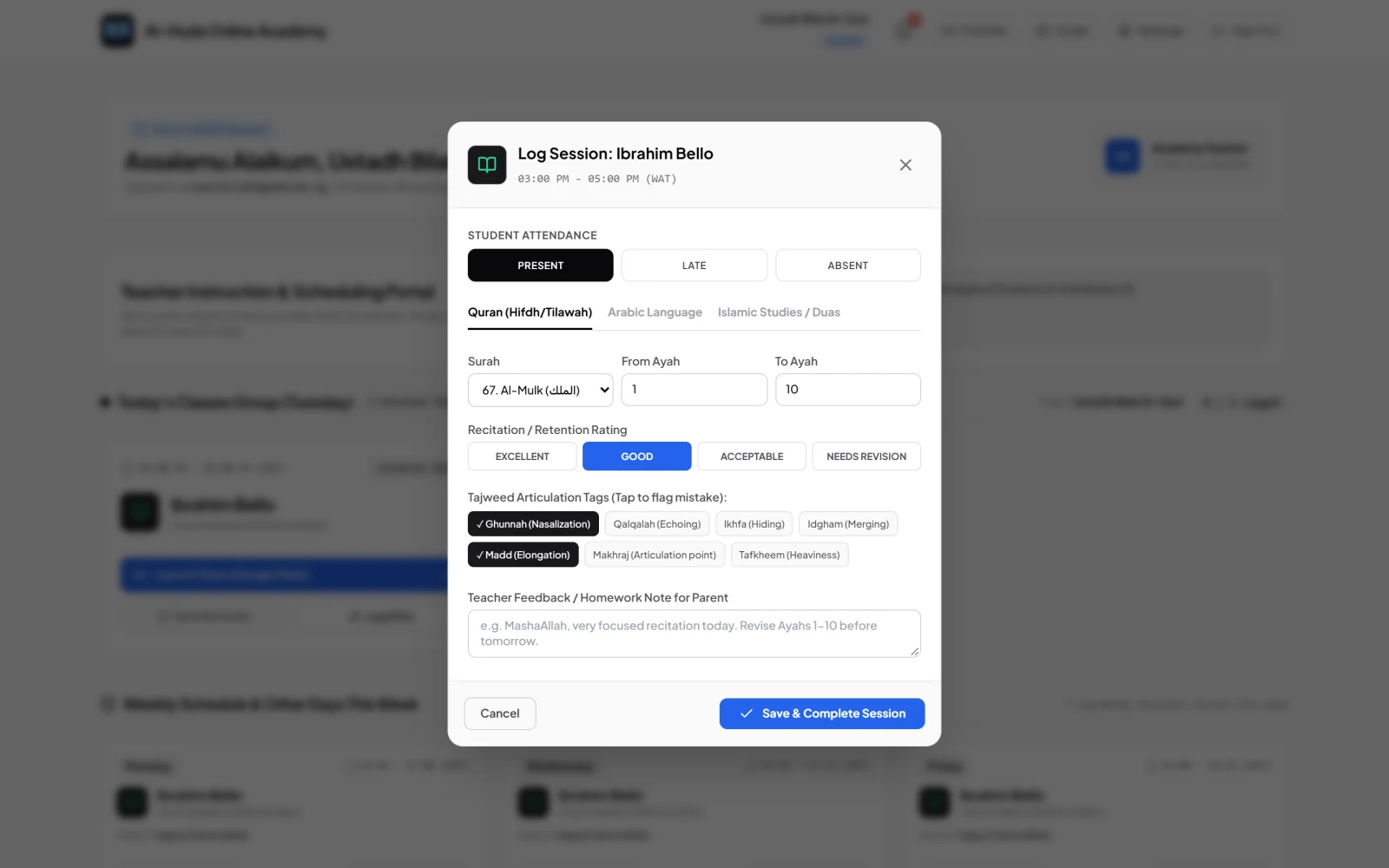
General school software may stop at grades and broad comments. A Quran programme may need the Surah and Ayah range, whether the work was a new lesson or revision, a rating, observed Tajweed or Makharij issues, teacher feedback and the next instruction. Read the detailed Quran progress tracking guide for a field-by-field evaluation.
Sabaq, Sabqi and Manzil are common labels in many Hifdh programmes, but terminology and practice vary. Ask the vendor to model your actual method. A label such as 'Hifz tracker' does not prove that daily new memorisation, recent revision, old revision, errors and history are stored in the form your teachers need.
A parent portal should answer practical questions without exposing another family's records: When is the next class? Was the learner present? What was covered? What should be revised? Adult learners need equivalent clarity through their own account. Sign in as every role, including accounts with no linked learner or assignment, and inspect the empty state.
The public form is only the first step. A useful admissions system shows the requested programme and timing, review status, responsible follow-up and how an approved applicant becomes a learner. The Quran academy admissions guide explains how to test that hand-off without collecting unnecessary information too early.
Clarify which payment problem the software solves. Software subscription billing, family fee collection, application fees, invoices, receipts, accounting and teacher payroll are different workflows. Verify currency, payment processor, transaction charges, split settlement, manual bank-transfer reconciliation and what happens after a failed or disputed payment.
Decide which messages belong in the authoritative school record and which can remain in WhatsApp, email or SMS. Ask about support hours, escalation, onboarding, import assistance, API access, website forms and third-party accounts. An integration logo is not proof that the complete workflow you need is supported.
Score each area only after seeing it work with a realistic scenario: 0 means absent, 1 means possible with significant manual work, and 2 means demonstrated clearly. Weight the areas for your school and keep written evidence beside the number.
| Area | Demonstration to request | Score |
| Student and family records | Create a minor, an adult and two siblings; show permissions and history | 0–2 |
| Teacher and group operations | Assign, reassign and teach a group without exposing unrelated learners | 0–2 |
| Scheduling | Create an international recurring class, then change one occurrence and a holiday | 0–2 |
| Attendance | Record learner absence, teacher absence and an authorised correction with reason | 0–2 |
| Learning progress | Log new memorisation and revision, then retrieve the learner's previous records | 0–2 |
| Parent/adult access | Sign in as each role and test linked, unlinked and empty accounts | 0–2 |
| Admissions | Submit a fictional trial form, review it and convert an approved applicant | 0–2 |
| Fees and reporting | Create, pay, reconcile and export a fictional invoice and report | 0–2 |
| Security and ownership | Show role boundaries, school isolation, backups, export and account closure | 0–2 |
| Mobile and support | Complete a teacher log and parent review on a phone, then test support | 0–2 |
The free session and attendance audit template provides fictional fields for testing learner attendance, teacher presence, class-held state, lesson evidence and authorised adjustments.
Islamic school software can contain children's information, guardian contacts, learning history, payment records and staff data. Security belongs in the buying process, not in a footnote.
Do not accept 'role-based' or 'multi-tenant' as complete answers. Ask the supplier to demonstrate negative cases: a teacher trying to open an unassigned learner, a parent trying to open another family's child, and an empty school that should contain no inherited classes or records.
Al-Ibiewi LMS is designed for online, physical and hybrid Quran academies, madrasahs, Arabic institutes and Islamic schools. It connects applications, learner and guardian records, teacher assignment, one-to-one and Halaqah schedules, attendance, Quran and subject progress, academy chat, monthly reports, report cards, calendars and parent fee collection in one tenant-scoped system.
For Quran lessons, an authorised teacher can add several entries to one session: new lesson (Sabaq), recent revision (Sabqi) and old revision (Manzil). Each entry can hold a Surah or multi-Surah range, its own rating and Tajweed observations. Arabic and Islamic Studies sessions can hold several topics. Teachers—not automation—make the academic judgement.
The platform distinguishes learner attendance, teacher presence and whether a class was held; supports individual and group workflows; and lets authorised staff review adjustments and reporting evidence. Parents and adult learners receive role-specific access, while each school's records and API key are isolated from other schools.
In Nigeria, the current public price is ₦500 per active learner per month with a ₦5,000 monthly school minimum; a school with no active learners owes nothing. Monthly reports, report cards, group classes, chat and parent fee collection are included. Families can pay school-issued invoices through Paystack, with settlement directed to the school's configured bank account. Verify the current commercial terms before deciding because pricing and payment rules can change.
Inspect the current role workflows in the video tutorial library. If the operating model matches your school, apply for an academy account or ask an implementation question. Bring the scorecard above and ask us to demonstrate the scenarios important to you.
The best choice is the one that passes your school's real workflows and access tests with acceptable cost and support. A live online Quran academy, full-time Islamic school, weekend maktab and masjid programme may reach different conclusions. Avoid rankings that do not publish their criteria, evidence date and commercial relationship.
It can be. General systems may be strong at classes, grades and finance. Specialist products may add Quran progress, revision methods, weekend-school structures, Islamic Studies records or masjid programmes. Test the ten tasks your staff perform most often; specialisation is useful only when it improves those tasks or preserves evidence that would otherwise live elsewhere.
Not always. A well-designed responsive or installable web application can cover phone, tablet, Chromebook, Windows, macOS and Linux without separate installations. Native applications can provide deeper device integration and app-store distribution. Test the teacher's post-class task and the parent's common tasks on the actual devices and network conditions they use.
No. The three-part approach is established in many settings, but terminology and revision structures vary. Qualified academic leadership should define the method; the software should record it accurately rather than forcing labels that teachers do not use consistently.
Software can make patterns, responsibilities and follow-up more visible, but it cannot guarantee an outcome. Teaching quality, school policies, family circumstances and consistent use also matter. Establish a baseline and measure your own results before attributing change to a product.
Recheck immediately before purchase and whenever a material contract, price, payment, privacy or feature decision depends on it. This comparison records what the vendors publicly described on 16 October 2026; it should not be treated as a permanent specification sheet.
Start with your school model, shortlist the products that publicly fit it, and give every vendor the same fictional scenarios. Inspect the resulting records, negative access cases, export, support process and total cost. A disciplined comparison is more useful than a universal ranking—and easier to defend when staff and families ask why the school chose its system.
Explore how Al-Ibiewi brings student records, schedules, attendance, learning progress and family visibility into one role-based workspace.
Keep reading

A practical guide for Nigerian Quran schools comparing scheduling, lesson records, parent access, fees, privacy, migration and support before choosing management software.

Use this practical checklist to prepare academy records, configure workflows, test access, train staff and make an evidence-based decision before going live.

A practical operating system for managing enquiries, trials, enrolment, teacher assignment, schedules, attendance, lesson records, family communication and monthly review.