Free Hifz Record Book for Quran Teachers (Printable PDF)
A free two-page hifz record book to print: a daily page for sabaq, sabqi and manzil with mistakes, a grade and a note for the family, and a page to follow all 30 juz. With a simple routine for teachers.
By Abubakar O. Zubair··5 min read
A hifz record book is the simplest way to know exactly where each learner is: what they memorised today, what they revised, and how well. This one is free. Print it, photocopy it, and share it with other teachers.
What is in the record book
Two A4 landscape pages in plain black and blue, so they photocopy well.
Page 1: daily lessons
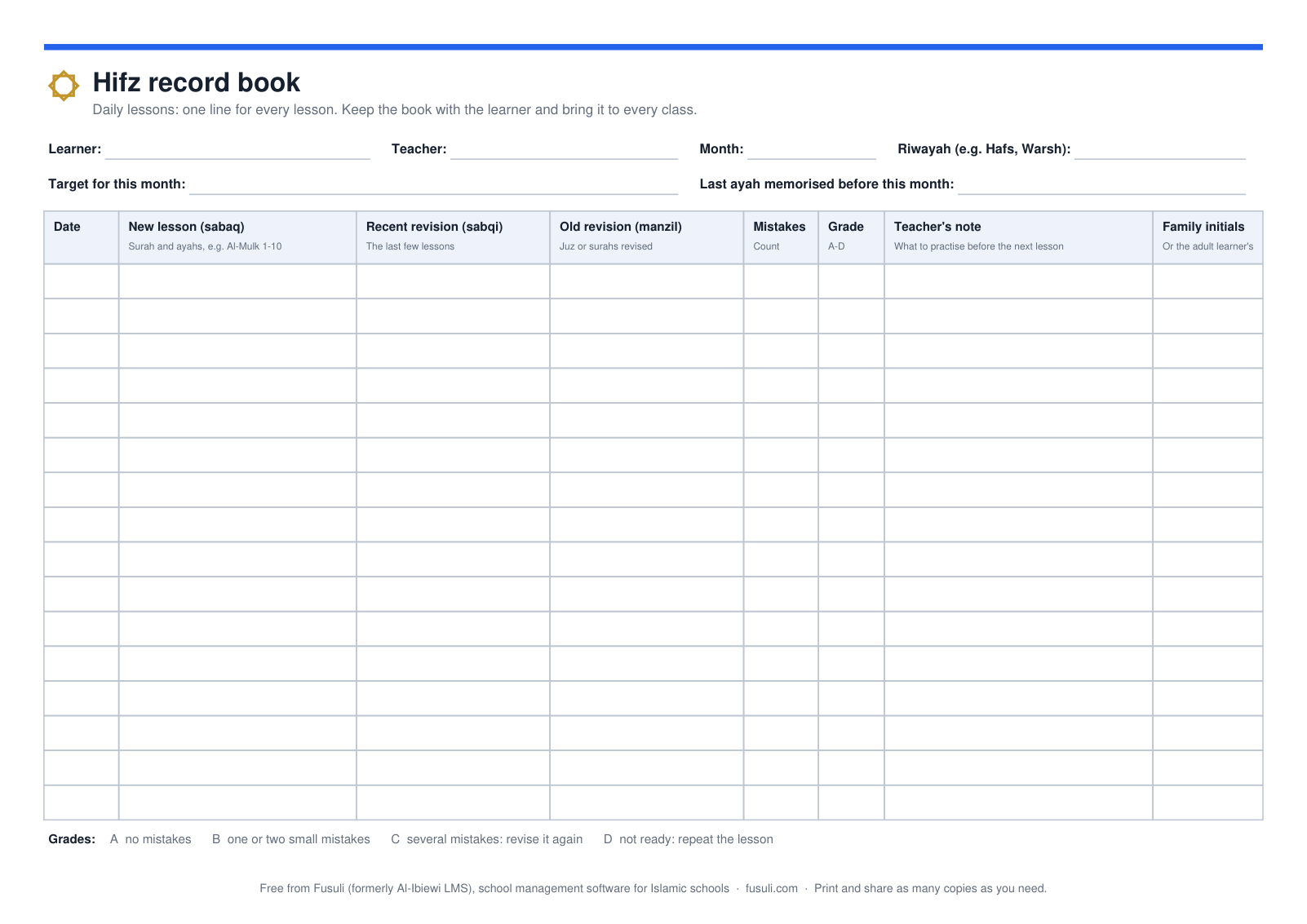
Page 1, shown at the top of this article, has one line for every lesson:
Date of the lesson.
New lesson (sabaq): the surah and ayahs memorised today, for example Al-Mulk 1-10.
Recent revision (sabqi): the last few lessons, recited again so they settle.
Old revision (manzil): the juz or surahs revised from what was memorised before.
Mistakes and a grade from A to D. The key is printed on the page.
Teacher's note: what to practise before the next lesson.
Family initials: a parent initials the line to show they saw it; an adult learner initials it themselves.
At the top, write the learner's name, the teacher, the month, the riwayah the learner reads (for example Hafs or Warsh), the target for the month and the last ayah memorised before the month began. At the bottom, total the page: new ayahs memorised, lessons attended out of lessons planned, and a comment from the teacher and from the family.
Page 2: progress across the 30 juz
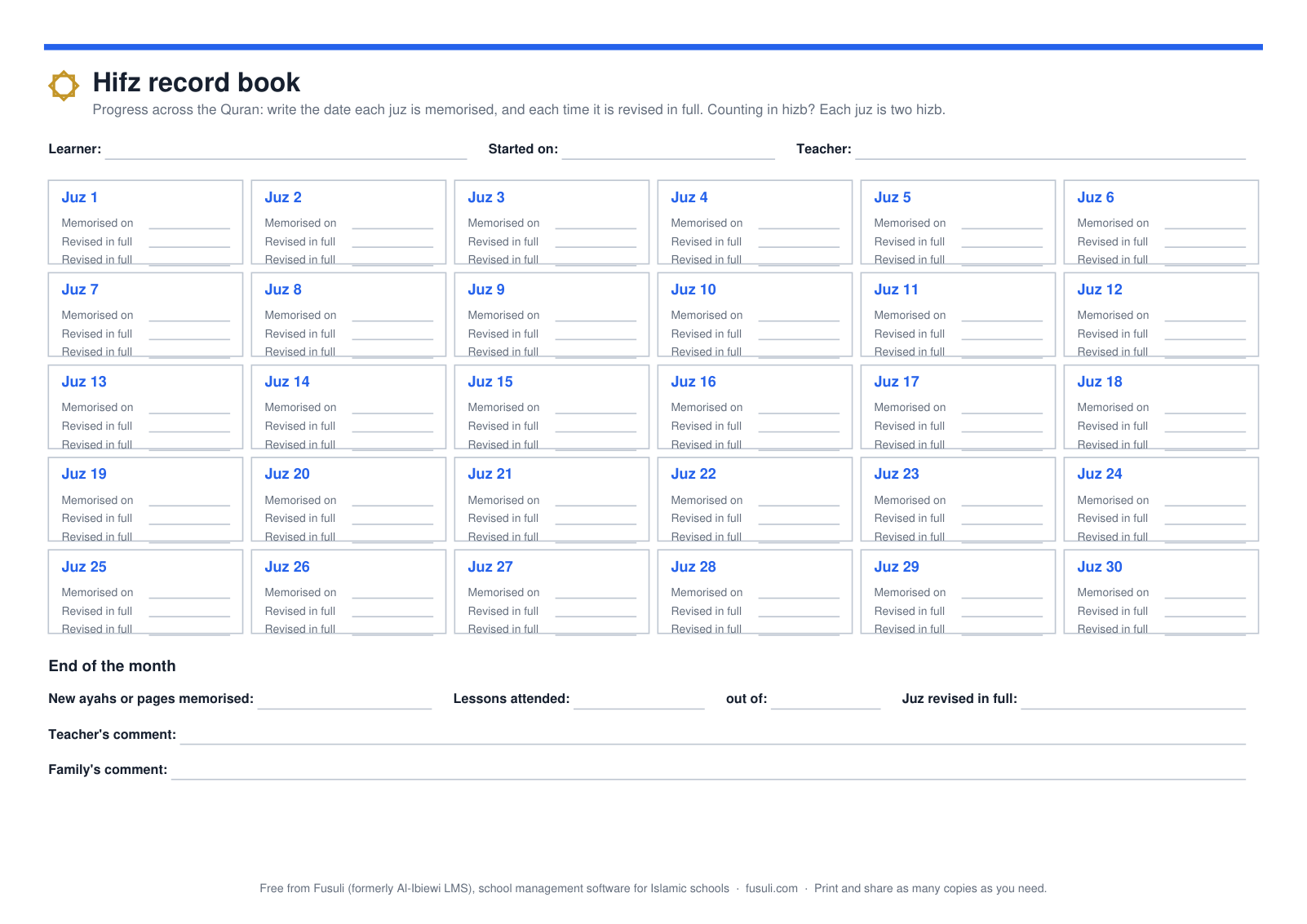
Page 2: kept for the whole hifz.
There is one box for each juz, with the date it was memorised and the dates it was revised in full, so the learner and the family see the whole journey on one page. Many learners start with Juz 30; the boxes work in any order. If your school counts in hizb, each juz is two hizb. Use the notes at the bottom for tests, an ijazah, or a juz that needs strengthening.
How to use it in a lesson
Before the lesson, read the last line. It tells you where the learner stopped and what you asked them to practise.
Hear the revision. Teachers order the old revision, the recent revision and the new lesson differently. The book does not mind, as long as each part goes in its own column.
Give and hear the new lesson. Write the exact surah and ayah range, not "half a page", so another teacher or the family knows exactly where the learner is.
Count the mistakes and give a grade. A count is fairer than a feeling, and over a week it shows the trend.
Write one line for the family: what to practise, and how many times.
Ask for the family's initials at the next lesson. For an online class, ask for a photo of the page on WhatsApp instead.
Reading the record: when to slow down
The page shows a problem before it becomes a habit. Slow the new lesson down when:
the recent revision keeps getting C or D, because the new lessons are not settling;
the old revision column has been empty for days, because what was memorised is being forgotten;
the mistakes rise across the week, even while the new lessons get good grades.
A faster new lesson rarely helps a learner whose revision is weak. Agree the pace with the family, and write it as the month's target at the top of the page.
For academies: one way of writing
If several teachers use the book, agree how to write things: how to write a surah and ayah range, what counts as a mistake, and what each grade means. Otherwise a B from one teacher is an A from another, and the records cannot be compared. Our guide to Quran progress tracking for academies goes further.
When paper is no longer enough
A paper book works well for one teacher and a few learners. It gets harder as the academy grows: the book is at home when the learner is in class, a teacher is away, a family abroad wants to see progress, or you need a report for the month. Fusuli (formerly Al-Ibiewi LMS) keeps the same record online:
After each class the teacher records, on their phone, whether it was a new lesson (sabaq), recent revision (sabqi) or old revision (manzil), the surah and ayah range, a rating and Tajweed notes.
The next log continues from the last ayah, so nothing is written twice.
Families see their own children's lessons, notes and progress, and the monthly reports and report cards come from the same record.
It costs ₦500 per learner a month, with no minimum and never more than ₦50,000 a month, and a learner is billed only after their first 5 days. We set your academy up for you, free: send us your list of teachers and learners on WhatsApp and we register them. Read more about Quran academy management software, or get started. Starting a new academy? Read how to start an online Quran academy.
Common questions
What are sabaq, sabqi and manzil?
They are the three parts of a hifz lesson in many Quran schools. Sabaq is the new lesson, sabqi is the revision of the last few lessons, and manzil is the revision of older memorisation. Some schools use other names; the columns work the same way.
How much should a learner memorise each day?
There is no single right amount. It depends on the learner's age, how strong their revision is, and how many days a week they come. Agree a target with the family, write it at the top of the page, and change it when the record shows the revision slipping.
Can I use it for Qaida or Tilawah lessons?
Page 1 works for reading lessons too: write the lesson or page in the new lesson column, and use the revision columns for what the learner reads again. Page 2 is for hifz only.
Can I share it?
Yes. Print it, photocopy it and send the PDF to other teachers, free.
Ten steps to start an online Quran academy: who you teach, class format, time zones, teachers, prices, one class link per teacher, written rules, lesson records, your first learners and the first month.
Download a practical Quran academy attendance and session-audit template that separates learner status, teacher presence, class outcomes, lesson evidence and follow-up.
A practical operating system for managing enquiries, trials, enrolment, teacher assignment, schedules, attendance, lesson records, family communication and monthly review.